Landing your dream web design job requires more than just a stunning portfolio. You need to ace the interview by demonstrating your technical skills, creative thinking, and problem-solving abilities.
In this comprehensive guide, we’ll walk through over 100 web designer interview questions and answers – both for freshers and experienced professionals. By the end of this article, you’ll be equipped with the knowledge to confidently tackle any web design interview and increase your chances of getting hired quickly.
Check out our Interview Prep App
Are you ready to transform your interview preparation and stand out from the crowd? Let’s dive in!
Table of Contents
- Basic Web Design Concepts
- Fresher Web Designer Interview Questions
- Experienced Web Designer Interview Questions
- Portfolio Questions
- Technical Skills Assessment
- Behavioral Questions
- Salary Negotiation Tips
- Post-Interview Steps
Basic Web Design Concepts
Before jumping into specific interview questions, let’s quickly refresh some fundamental web design concepts that you should be familiar with.
What is Web Design?
Web design involves creating the visual elements, layout, and user experience of websites. It encompasses everything from color schemes and typography to navigation and responsive layouts.
Types of Web Designers
- UI (User Interface) Designer – Focuses on the visual aspects of websites
- UX (User Experience) Designer – Concentrates on how users interact with the website
- Full-Stack Designer – Handles both design and front-end development

Core Web Design Languages
- HTML – Creates the structure of web pages
- CSS – Styles the HTML elements
- JavaScript – Adds interactivity to websites
Now that we’ve covered the basics, let’s explore the specific interview questions you might encounter.
Fresher Web Designer Interview Questions
If you’re new to the field, these questions will help you prepare for your first web design job interview.
Personal Questions asked in web designer interview questions
1. Why should we hire you as a web designer?
Answer: “I bring a fresh perspective combined with strong fundamental skills in HTML, CSS, and JavaScript. During my education, I’ve completed several projects that demonstrate my ability to create clean, user-friendly designs. I’m eager to learn and adapt quickly to your company’s processes and design standards. My passion for staying updated with the latest design trends means I can contribute innovative ideas while maintaining practical functionality in my work.”
2. Why did you choose web design as your career?
Answer: “I’ve always been fascinated by the intersection of creativity and technology. Web design allows me to express my artistic abilities while solving real problems through code. I love how a well-designed website can transform a user’s experience and help businesses achieve their goals. The constantly evolving nature of web technologies also ensures I’ll always have something new to learn and master.”
3. What are your greatest strengths as a web designer?
Answer: “My greatest strengths include attention to detail, creative problem-solving, and strong time management. I pride myself on creating pixel-perfect designs that also function flawlessly. I’m also highly adaptable and quick to learn new tools and technologies, which is essential in this fast-evolving field.”
4. What are your weaknesses?
Answer: “Sometimes I can be overly detail-oriented, which occasionally impacts my speed. However, I’ve addressed this by implementing a structured workflow that balances quality and efficiency. I now set specific timeframes for different stages of the design process and use productivity tools to keep myself accountable.”
5. Where do you see yourself in 5 years?
Answer: “In five years, I aim to have evolved into a senior web designer with expertise in UX/UI design principles. I plan to develop specialized skills in interactive design and potentially lead design projects. I’m also interested in mentoring junior designers and contributing to the growth of the design team.”
Technical Questions for Freshers
6. What is the full form of HTML?
Answer: “HTML stands for HyperText Markup Language. It’s the standard markup language for creating web pages and applications.”
7. What are the main HTML5 features?
Answer: “HTML5 introduced several important features including semantic elements like <header>, <footer>, and <section>, native support for audio and video, canvas for drawing graphics, local storage capabilities, and improved form controls.”
8. What is CSS and why is it important?
Answer: “CSS (Cascading Style Sheets) is a stylesheet language used to describe the presentation of HTML documents. It’s important because it separates content from presentation, allows consistent styling across multiple pages, enables responsive design, and improves page load times by reducing redundant code.”
9. Explain the box model in CSS.
Answer: “The CSS box model describes how elements are rendered on a webpage. It consists of content, padding, border, and margin. The content is the actual element, padding is the space between the content and border, the border surrounds the padding, and the margin is the space outside the border.”

10. What is responsive web design?
Answer: “Responsive web design is an approach that makes web pages render well on various devices and window or screen sizes. It uses CSS media queries to adapt layouts to different devices, fluid grid concepts, and flexible images to ensure optimal viewing experience.”
11. What are media queries in CSS?
Answer: “Media queries are CSS techniques that allow content to adapt to different screen sizes and device capabilities. They let you apply different styles based on characteristics like width, height, orientation, or resolution of the viewing device.”
12. What is JavaScript used for in web design?
Answer: “JavaScript is used to add interactivity to websites. This includes form validation, creating animations, building interactive maps, implementing sliders and carousels, fetching data from servers, and creating dynamic content updates without page reloads.”
13. What are the different types of CSS selectors?
Answer: “CSS selectors include element selectors (like p), class selectors (.classname), ID selectors (#idname), attribute selectors ([attribute=value]), pseudo-class selectors (:hover), and pseudo-element selectors (::before). Each has different specificity and use cases.”
14. How do you link an external CSS file to an HTML document?
Answer: “You link an external CSS file using the <link> element in the HTML <head> section. For example: <link rel=\"stylesheet\" href=\"styles.css\">.”
15. What is the difference between padding and margin?
Answer: “Padding is the space between an element’s content and its border, while margin is the space outside an element’s border. Padding affects the element’s size and has the same background color as the element, while margin creates space between elements and is always transparent.”
Portfolio Questions for Freshers web designer interview questions
16. How did you approach your portfolio projects?
Answer: “For each project in my portfolio, I started by defining clear objectives and target audiences. I then created wireframes and mockups before implementing the designs with HTML, CSS, and JavaScript. Throughout the process, I focused on usability, accessibility, and responsive design principles.”
17. What design tools are you familiar with?
Answer: “I’m proficient with industry-standard tools including Figma for creating wireframes and mockups. I also use Adobe Photoshop and Illustrator for image editing and graphic design. For prototyping, I’ve worked with Figma’s prototyping features and Framer.”
18. How do you ensure your designs are accessible?
Answer: “I ensure accessibility by using semantic HTML elements, providing sufficient color contrast, adding alt text for images, ensuring keyboard navigation works properly, and testing with screen readers. I follow WCAG guidelines and use tools like the WAVE Web Accessibility Evaluation Tool to check my work.”
19. Can you explain your design process?
Answer: “My design process typically includes research, wireframing, creating mockups, prototyping, gathering feedback, refining the design, and finally implementation. I believe in user-centered design, so I incorporate user feedback at multiple stages.”
20. How do you stay updated with current design trends?
Answer: “I regularly follow design blogs like Smashing Magazine, UX Collective, and CSS-Tricks. I participate in online communities like Dribbble and Behance to see other designers’ work. I also take online courses to learn new techniques and attend webinars and virtual design conferences when possible.”
Experienced Web Designer Interview Questions
For designers with 3+ years of experience, interviewers will dig deeper into your expertise and leadership abilities.
Advanced Technical Web Designer Interview Questions
21. Explain the difference between adaptive and responsive design.
Answer: “Responsive design uses fluid grids and flexible images to adapt to any screen size using CSS media queries. It’s a single design that changes based on viewport dimensions. Adaptive design, however, creates multiple fixed-layout designs for specific screen sizes and serves the appropriate version based on detected device. Responsive is generally more flexible, while adaptive can be more optimized for specific devices.”
22. What are CSS preprocessors and which ones have you used?
Answer: “CSS preprocessors are scripting languages that extend CSS with variables, nesting, mixins, inheritance, and other features that make CSS more maintainable. I’ve primarily worked with SASS/SCSS, which offers excellent variable support and mixins. I’ve also used Less on some projects. Preprocessors significantly improve my workflow by allowing me to create reusable code components and maintain consistent styling across large projects.”
23. How do you optimize website performance?
Answer: “I optimize websites by minimizing HTTP requests, compressing images, implementing lazy loading, minifying CSS and JavaScript files, using CSS sprites, leveraging browser caching, and employing CDNs. I also focus on critical rendering path optimization by prioritizing above-the-fold content and reducing render-blocking resources. I regularly use tools like Google PageSpeed Insights and GTmetrix to identify performance bottlenecks.”
24. Explain your experience with design systems.
Answer: “I’ve developed and maintained design systems that include component libraries, style guides, and documentation. A well-structured design system ensures consistency across products while accelerating the design process. I’ve implemented atomic design principles to create scalable component hierarchies and worked with tools like Storybook to document components for developer handoff.”

25. How do you handle cross-browser compatibility issues?
Answer: “I address cross-browser compatibility by using feature detection rather than browser detection, implementing progressive enhancement, using vendor prefixes where necessary, and regularly testing on multiple browsers. I leverage tools like Modernizr for feature detection and BrowserStack for comprehensive cross-browser testing. I also maintain a baseline of supported browsers for each project to set clear expectations.”
26. What is your experience with CSS Grid vs. Flexbox?
Answer: “CSS Grid and Flexbox are complementary layout systems. I use Flexbox for one-dimensional layouts (rows or columns) and Grid for two-dimensional layouts. For example, I’ll use Flexbox for navigation menus or aligning items within a component, while Grid works better for overall page layouts with multiple rows and columns. I often combine both: Grid for the macro layout and Flexbox for component-level arrangements.”
27. How do you approach animation in web design?
Answer: “My approach to web animations focuses on enhancing user experience without being distracting. I primarily use CSS transitions and animations for simple effects due to their performance benefits. For more complex animations, I use JavaScript libraries like GSAP or Framer Motion. I always consider performance implications, accessibility (respecting reduced motion preferences), and ensuring animations serve a purpose rather than just being decorative.”
28. Explain your experience with version control systems.
Answer: “I’ve extensively used Git for version control, working with platforms like GitHub and GitLab. I’m comfortable with branching strategies like Git Flow for team collaboration. Version control has been essential for tracking changes, collaborating with developers, managing feature branches, and maintaining design history. I also use design tools with version control features like Figma’s built-in version history.”
29. How do you handle responsive images for different devices?
Answer: “I implement responsive images using a combination of techniques: the srcset and sizes attributes for serving different resolutions, <picture> element for art direction, and CSS techniques like object-fit for controlling how images scale. I also use modern image formats like WebP with appropriate fallbacks and lazy loading to optimize performance. This comprehensive approach ensures images look good on all devices while minimizing bandwidth usage.”
30. What design patterns have you implemented and why?
Answer: “I’ve implemented various design patterns including card layouts for content organization, hamburger menus for mobile navigation, infinite scrolling for content discovery, and skeleton screens for perceived performance. Each pattern solves specific usability problems—for instance, I chose skeleton screens over traditional loaders because they reduce perceived wait time and prevent layout shifts, resulting in better user experience metrics in A/B testing.”
Leadership and Project Management Web Designer Interview Questions
31. How do you handle feedback and criticism on your designs?
Answer: “I view feedback as an essential part of the design process rather than a personal critique. I ask clarifying questions to understand concerns, focus on the problem rather than my solution, and prioritize user needs over personal preferences. I’ve developed specific processes for feedback collection, including structured review sessions with stakeholders and user testing. This approach has helped me improve designs while maintaining productive relationships with team members and clients.”
32. Describe a challenging project and how you overcame obstacles.
Answer: “I led a redesign for a financial services client with complex data visualization needs and strict compliance requirements. The main challenges included balancing data density with usability and meeting aggressive deadlines. I overcame these by implementing progressive disclosure techniques for complex information, creating a modular design system to accelerate development, and establishing clear communication channels with stakeholders. We delivered on time by prioritizing critical user journeys first, then iteratively enhancing secondary features.”
33. How do you collaborate with developers in your projects?
Answer: “Effective designer-developer collaboration is crucial for successful implementation. I create detailed design specifications with comprehensive documentation, including interaction states and edge cases. I use tools like Figma’s Inspect mode for precise handoff. Coupled with also involve developers early in the design process to understand technical constraints, participate in code reviews to ensure design integrity, and remain available during implementation to clarify design decisions and make necessary adjustments.”
34. How do you manage multiple projects simultaneously?
Answer: “I manage multiple projects using a combination of time blocking, prioritization frameworks, and project management tools like Asana or Trello. I create weekly and daily plans with specific deliverables, schedule focused design time for complex tasks, and maintain communication transparency with all stakeholders about timelines and dependencies. I also identify opportunities for design system reuse across projects to increase efficiency without compromising quality.”
35. How have you improved design processes at previous companies?
Answer: “At my previous company, I identified that our design review process was causing delays and inconsistent feedback. I implemented a structured critique framework with specific roles (presenter, facilitator, notetaker) and focused evaluation criteria. This reduced our design iteration cycles by 30% and improved design consistency. I also introduced design sprints for complex problems, which helped align stakeholders earlier and reduced major revisions later in the process.”
Industry and Trend Web Designer Interview Questions
36. How do you see web design evolving in the next few years?
Answer: “I see web design moving toward more immersive experiences with increased use of 3D elements, AR/VR integration, and advanced animations. Voice interfaces and accessibility will become standard considerations rather than afterthoughts. Design systems will continue to mature, with more automation in implementation. Performance and sustainability will gain importance, leading to more efficient design approaches. I’m particularly interested in how AI tools will augment design processes, potentially automating repetitive tasks while allowing designers to focus on higher-level creative and strategic work.”
37. What is your experience with design tokens and how do they improve workflow?
Answer: “Design tokens are the atomic values that store design attributes like colors, typography, and spacing. I’ve implemented token-based systems that serve as a single source of truth across platforms. By abstracting design values into tokens, we achieved better consistency, simplified theme creation, and streamlined the process of implementing design changes. For example, updating a primary color across an entire product became a single token change rather than hundreds of CSS modifications.”
38. How do you balance creativity with business objectives?
Answer: “I view design as a problem-solving discipline that must align with business goals. I start projects by clearly defining success metrics and business constraints. Throughout the design process, I regularly refer back to these objectives and validate decisions against them. I use techniques like design sprints to rapidly explore creative solutions while maintaining focus on business impact. This approach has helped me deliver designs that are both innovative and effective at achieving measurable business results.”
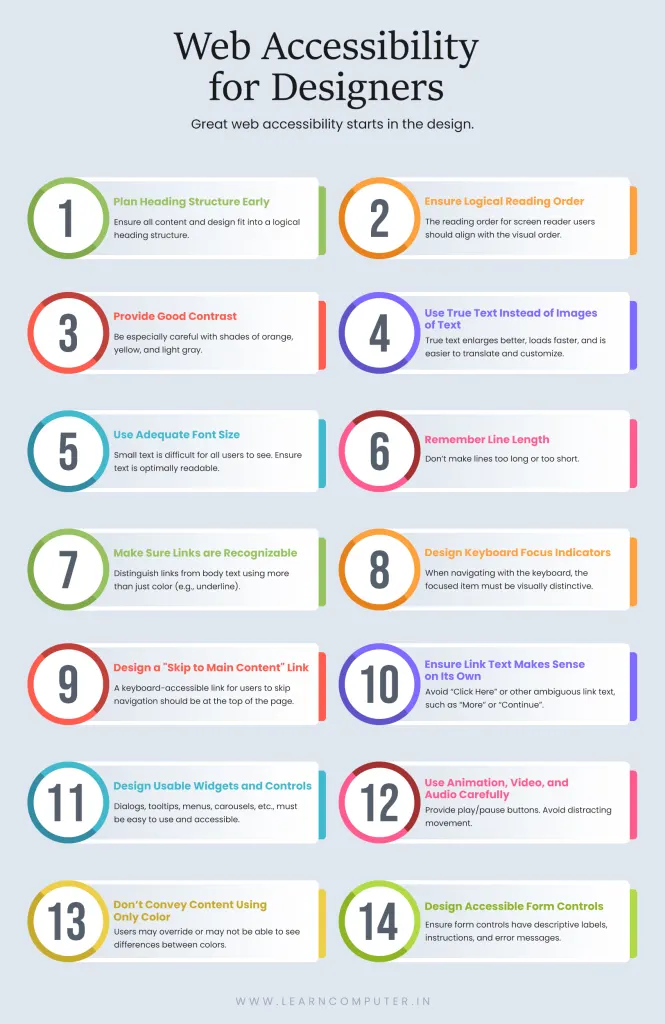
39. How do you incorporate accessibility in your design process?
Answer: “I’ve integrated accessibility throughout my design process rather than treating it as a final check. This includes using inclusive design principles from the start, incorporating WCAG guidelines into design systems, conducting regular accessibility audits, and testing with assistive technologies. I’ve found that designing for accessibility often improves usability for all users and helps anticipate edge cases. I ensure our color palettes meet contrast requirements, interactive elements are keyboard accessible, and complex interactions have appropriate alternatives.”
40. What are your thoughts on the impact of AI on web design?
Answer: “AI is transforming web design in several ways: generating code from design mockups, creating personalized user experiences, automating testing, and even generating design variations. While AI tools can accelerate certain aspects of design work, I believe they’re most valuable when they augment human creativity rather than replace it. I’ve incorporated AI tools for tasks like image optimization and content recommendations, which frees up time for more strategic design thinking and complex problem-solving that still requires human insight.”
Technical Skills Assessment
These questions dive deeper into your technical knowledge and problem-solving abilities.
HTML Web Designer Interview Questions
41. What are semantic HTML elements and why are they important?
Answer: “Semantic HTML elements clearly describe their meaning to both browsers and developers. Examples include <header>, <nav>, <article>, and <footer>. They’re important because they improve accessibility for screen readers, enhance SEO by helping search engines understand page structure, make code more maintainable and readable, and provide consistent structure across websites.”
42. Explain the difference between <div> and <span>.
Answer: “<div> is a block-level element that starts on a new line and takes up the full width available. It’s typically used as a container for other HTML elements. <span> is an inline element that only takes up as much width as necessary and doesn’t start on a new line. It’s used to apply styles to specific portions of text within larger elements.”
43. How do you embed video in HTML5?
Answer: “HTML5 provides the <video> element for embedding videos. A basic implementation looks like this:
<video width=\"320\" height=\"240\" controls>
  <source src=\"movie.mp4\" type=\"video/mp4\">
  <source src=\"movie.ogg\" type=\"video/ogg\">
  Your browser does not support the video tag.
</video>
This includes multiple source formats for browser compatibility and a fallback message.”
44. What is the purpose of the alt attribute in images?
Answer: “The alt attribute provides alternative text for images when they cannot be displayed or for users using screen readers. It improves accessibility, helps with SEO by giving search engines context about the image, and displays when images fail to load. Good alt text should concisely describe the image’s content and function.”
45. What is the difference between localStorage and sessionStorage?
Answer: “Both localStorage and sessionStorage are web storage APIs that store data in key-value pairs. The main difference is persistence: localStorage data has no expiration time and remains until explicitly deleted, even when the browser is closed. sessionStorage data is cleared when the page session ends (when the browser tab is closed). Both have similar APIs and are limited to storing about 5MB of data per domain.”
CSS Questions
46. Explain the difference between absolute, relative, fixed, and sticky positioning.
Answer: “These are CSS position values that control how elements are placed in a document:
- Relative positioning moves an element from its normal position, but still reserves its original space in the flow.
- Absolute positioning removes an element from the normal flow and positions it relative to its nearest positioned ancestor.
- Fixed positioning removes an element from the flow and positions it relative to the viewport, so it stays in the same place even when scrolling.
- Sticky positioning is a hybrid: it acts like relative positioning until the element crosses a specified threshold, then acts like fixed positioning.”
47. What are CSS variables and how do you use them?
Answer: “CSS variables (custom properties) store values that can be reused throughout a stylesheet. They’re defined with double hyphens and accessed with the var() function. For example:
:root {
  --primary-color: #3498db;
}

.button {
  background-color: var(--primary-color);
}
They improve maintainability by centralizing values, enable theming, and can be manipulated with JavaScript.”
48. How do you create a responsive grid layout?
Answer: “I create responsive grid layouts using CSS Grid. A basic implementation looks like:
.grid-container {
  display: grid;
  grid-template-columns: repeat(auto-fill, minmax(250px, 1fr));
  gap: 20px;
}
This creates columns that are at least 250px wide and automatically adjust to fill the available space. For older browsers, I’d use a flexbox-based approach with percentage widths and media queries.”
49. What is the difference between display: none and visibility: hidden?
Answer: “display: none removes the element completely from the document flow—it takes up no space and is not rendered. visibility: hidden hides the element but keeps its space in the layout—the element is invisible but still affects the flow of the document. This difference is important when considering layout shifts and accessibility.”
50. Explain CSS specificity and how it works.
Answer: “CSS specificity determines which styles are applied when multiple rules target the same element. It’s calculated as a four-part value (a,b,c,d):
- a: Inline styles (1 if present, 0 if not)
- b: Number of ID selectors
- c: Number of class selectors, attribute selectors, and pseudo-classes
- d: Number of element selectors and pseudo-elements
Higher specificity rules override lower ones. For example, an ID selector (#nav) overrides a class selector (.navigation).”

JavaScript Web Designer Interview Questions
51. What’s the difference between == and === in JavaScript?
Answer: “The double equals (==) is a loose equality operator that compares values after attempting type conversion. The triple equals (===) is a strict equality operator that compares both value and type without conversion. For example, '5' == 5 returns true because the string ‘5’ is converted to the number 5, but '5' === 5 returns false because they’re different types.”
52. Explain event bubbling and capturing in JavaScript.
Answer: “Event propagation in the DOM has two phases: capturing and bubbling. During capturing, the event travels from the document root down to the target element. During bubbling, it travels from the target back up to the root. By default, event listeners are triggered during the bubbling phase. You can specify which phase to listen for using the third parameter of addEventListener: element.addEventListener('click', handler, useCapture) where useCapture is true for capturing phase and false for bubbling.”
53. What are arrow functions and how do they differ from regular functions?
Answer: “Arrow functions are a concise syntax for writing functions in JavaScript:
// Regular function
function add(a, b) {
  return a + b;
}

// Arrow function
const add = (a, b) => a + b;
Key differences include: arrow functions don’t have their own this context (they inherit from the parent scope), they can’t be used as constructors, they don’t have the arguments object, and they can’t be used with yield within generators.”
54. How do you make AJAX requests in JavaScript?
Answer: “I use the Fetch API for making AJAX requests in modern applications:
fetch('https://api.example.com/data')
  .then(response => response.json())
  .then(data => console.log(data))
  .catch(error => console.error('Error:', error));
For older browsers, I’d use XMLHttpRequest. For more complex requirements, I might use libraries like Axios that provide additional features and consistent browser support.”
55. What is DOM manipulation and how do you perform it?
Answer: “DOM manipulation involves changing the document structure, content, or styling using JavaScript. Common operations include:
// Creating elements
const newDiv = document.createElement('div');

// Modifying content
element.textContent = 'New text';
element.innerHTML = '<span>HTML content</span>';

// Adding/removing classes
element.classList.add('active');
element.classList.remove('inactive');

// Changing styles
element.style.color = 'blue';

// Adding/removing elements
parent.appendChild(newChild);
parent.removeChild(childElement);
Modern frameworks like React abstract direct DOM manipulation to improve performance and maintainability.”
UX/UI Design Web Designer Interview Questions
These questions assess your understanding of user experience principles.
56. What is the difference between UX and UI design?
Answer: “UI (User Interface) design focuses on the visual elements users interact with—the look and feel, including colors, typography, buttons, and animations. UX (User Experience) design encompasses the entire user journey and how users interact with a product. UX involves research, wireframing, prototyping, and testing to ensure the product is useful, usable, and enjoyable. While UI is a component of UX, UX extends beyond visual design to include information architecture, user flows, and overall satisfaction.”
57. Explain the importance of user research in the design process.
Answer: “User research is fundamental to creating effective designs because it removes assumptions and provides evidence-based insights. It helps identify actual user needs, behaviors, and pain points rather than designing based on stakeholder opinions or personal preferences. Research methods like interviews, surveys, and usability testing validate design decisions and often reveal unexpected insights. Projects with strong research foundations typically require fewer iterations, have higher user satisfaction, and better meet business objectives.”
58. How do you approach designing for different user personas?
Answer: “I develop detailed user personas based on research data, including demographics, goals, pain points, and behaviors. For each persona, I map out specific user journeys and identify key touchpoints. This helps me design features and interactions that address their unique needs. For example, a tech-savvy younger user might prefer gesture-based navigation, while an older user might need more explicit instructions and larger tap targets. I regularly refer back to these personas during design reviews to ensure we’re solving the right problems for our actual users.”
59. What is information architecture and why is it important?
Answer: “Information architecture (IA) is the structural design of information environments—how content is organized, labeled, and navigated. Good IA ensures users can find information efficiently and understand where they are within a system. I approach IA by conducting card sorting exercises with users to understand their mental models, creating site maps and user flows, and testing navigation patterns. Effective IA reduces cognitive load, decreases bounce rates, and improves conversion by making information discoverable and contextually relevant.”
60. How do you ensure your designs are inclusive and accessible?
Answer: “I integrate accessibility throughout the design process by following WCAG guidelines and practicing inclusive design principles. This includes maintaining sufficient color contrast (minimum 4.5:1 for normal text), providing text alternatives for non-text content, ensuring keyboard navigability, creating focus states for interactive elements, and designing with screen readers in mind. I test designs with accessibility tools like WAVE and screen readers, and incorporate feedback from diverse user groups. I view accessibility not as a checkbox but as a core design principle that improves usability for everyone.”
Behavioral Web Designer Interview Questions
These questions assess your soft skills and how you handle workplace situations.
61. Describe a time when you had to compromise on a design decision.
Answer: “On an e-commerce project, I designed a sophisticated product filtering system that I believed would significantly improve the shopping experience. However, development resources were limited due to other priorities. Rather than pushing for the full implementation, I worked with developers to identify a minimal viable version that addressed the core user needs while staying within resource constraints. We implemented the simplified version with a modular architecture that allowed for future enhancements. This compromise resulted in a 15% improvement in conversion rate while maintaining the project timeline.”
62. How do you handle conflicting feedback from different stakeholders?
Answer: “In a recent redesign project, the marketing team wanted prominent call-to-actions that sometimes conflicted with the product team’s focus on user experience. I facilitated a workshop where both teams shared their objectives and constraints. Then I created design options that addressed both perspectives and used data from A/B testing to validate which approach better met overall business goals. This evidence-based approach helped resolve the conflict objectively and resulted in a solution that improved both conversion rates and user satisfaction metrics.”
63. Tell me about a time when you had to meet a tight deadline.
Answer: “For a product launch, we had an immovable deadline due to a major industry event. Midway through the project, we received significant new requirements that threatened the timeline. I immediately re-prioritized features into must-haves and nice-to-haves based on user impact, created a revised schedule with daily milestones, and coordinated with development teams to identify implementation efficiencies. We focused on completing the core user flows first and worked some additional hours in the final week. We successfully launched on time with all essential features, and then released the secondary features in a planned update two weeks later.”
64. How do you stay organized when working on multiple projects?
Answer: “I use a combination of time blocking and project management tools to stay organized. Each week, I review all active projects and schedule focused design time for each one based on priorities and deadlines. I maintain detailed documentation for each project, including status updates, design decisions, and outstanding items. For task management, I use the Eisenhower Matrix to categorize tasks by urgency and importance. This system helps me maintain clear boundaries between projects and ensures nothing falls through the cracks even when juggling multiple deadlines.”
65. Describe your approach to mentoring junior designers.
Answer: “I believe in balancing guidance with autonomy when mentoring junior designers. I start by understanding their career goals and skill gaps, then create opportunities that address those areas. I use a structured feedback approach: regular reviews of their work with specific actionable feedback, paired design sessions for complex problems, and encouraging them to present their work to stakeholders with my support. Accordingly I also share relevant resources and introduce them to my professional network. I measure success by their growing independence and the increasing complexity of projects they can handle confidently.”
Portfolio-Related Web Designer Interview Questions
Your portfolio is often your first impression—be prepared to discuss it in detail.
66. Walk me through the most challenging project in your portfolio.
Answer: “My most challenging project was redesigning a legacy financial application with complex workflows and strict regulatory requirements. The main challenges included simplifying 15-year-old interfaces without disrupting experienced users’ workflows, ensuring compliance with financial regulations, and working within significant technical constraints. I approached this by conducting contextual inquiries with power users, creating detailed task flows to identify simplification opportunities, and developing a phased migration strategy. The result was a 30% reduction in training time for new users while maintaining efficiency for experienced users.”
67. How do you choose which projects to include in your portfolio?
Answer: “I select portfolio projects that demonstrate range, problem-solving abilities, and measurable impact. I prioritize projects that show different skills—UI design, interaction design, information architecture, and visual design. I focus on including work that demonstrates my problem-solving process rather than just visual appeal. For each project, I clearly articulate the challenge, my approach, and quantifiable results like improved conversion rates or usability metrics. I also consider the relevance to the roles I’m applying for, emphasizing e-commerce projects when applying to retail companies, for example.”
68. How has your design style evolved over time?
Answer: “My design style has evolved from being primarily aesthetics-focused to becoming more strategic and user-centered. Early in my career, I emphasized visual trends and distinctive styling. As I gained experience, I developed a deeper appreciation for how design solves business and user problems. My current approach balances aesthetic principles with usability, accessibility, and business objectives. I’ve also become more systematic, creating cohesive design systems rather than standalone pages. This evolution reflects my growing understanding that effective design goes beyond looking good—it must work exceptionally well and deliver measurable results.”
69. What project are you most proud of and why?
Answer: “I’m most proud of redesigning an educational platform that helps low-income students prepare for standardized tests. The project required balancing limited technical resources with high-impact features for students with varied learning styles and access needs. I’m proud of it because we achieved a 40% increase in lesson completion rates and significantly improved accessibility for students with disabilities. But beyond the metrics, I’ve received personal messages from students about how the platform helped them achieve their educational goals. It exemplifies my belief that good design can create meaningful social impact while also meeting business objectives.”
70. If you could redo any project in your portfolio, what would you change?
Answer: “I would revisit an e-commerce mobile app I designed three years ago. While it met the business objectives, I would now approach the information architecture differently. Based on what I’ve learned since then, I would conduct more thorough card sorting exercises to better align the category structure with users’ mental models. I’d also implement a more robust component system to improve consistency and development efficiency. The project was successful, but these changes would have made maintenance easier and improved the long-term user experience as the product catalog expanded.”
Technical Design Web Designer Interview Questions
Be prepared for on-the-spot design challenges during interviews.
71. How would you redesign our homepage to improve conversion rates?
Answer: “I’d approach this systematically. First, I’d analyze current analytics to identify drop-off points and user behavior patterns. Then I’d examine the primary user journey and ensure the most important CTAs are visible above the fold. I’d simplify the visual hierarchy to guide users toward key actions, implement social proof elements like testimonials and trust badges, and optimize page load speed. For mobile users, I’d ensure tap targets are appropriately sized and positioned. I’d also recommend A/B testing several versions to validate which changes most effectively improve conversion rates.”
72. How would you design a form that minimizes user errors?
Answer: “To design an error-minimizing form, I’d implement real-time validation with clear error messages that appear as users type rather than after submission. I’d use input masks for formatted fields like phone numbers and dates, provide example text in placeholders, and group related fields logically. I’d minimize the number of required fields and use appropriate input types (like email keyboards for email fields). Also I’d implement a progress indicator for multi-step forms and ensure the form is fully accessible with proper labels and ARIA attributes. Finally, I’d design a confirmation step that allows users to review their information before final submission.”
73. How would you approach designing for users with low technical literacy?
Answer: “For users with low technical literacy, I’d focus on clear, jargon-free language and intuitive visual cues. I’d implement progressive disclosure to prevent overwhelming users with too many options at once, use familiar design patterns that users might recognize from other websites, and provide more explicit instructions and tooltips. I’d design larger touch targets, use obvious visual distinctions for interactive elements, and provide immediate feedback for actions. Also I’d include easily accessible help resources and consider implementing guided tours for complex features. Most importantly, I’d test the design with actual users from this demographic to identify and address pain points.”
74. How would you design a navigation system for a content-heavy website?
Answer: “For a content-heavy site, I’d implement a multi-level navigation system with clear categorization based on user mental models. I’d use mega menus for desktop to expose important subcategories, combined with a persistent search function prominently placed in the header. For mobile, I’d use a collapsible drawer navigation with clear category labels and visual indicators for nested content. I’d implement breadcrumbs to help users maintain context and include a recently viewed/history feature. I’d also consider adding content recommendations based on user behavior and a well-structured site map page. This approach balances comprehensive access with usability across devices.”
75. Sketch a mobile app interface for a food delivery service.
Answer: “I’d design a food delivery app with a clean, focused interface. The home screen would feature a prominent search bar at the top, followed by horizontal scrolling categories (Restaurants, Cuisines, Deals). Below that, I’d include personalized recommendations based on past orders and browsing history. Each restaurant card would display key information: name, cuisine type, average rating, delivery time, and delivery fee. The navigation would use a bottom tab bar with icons for Home, Search, Orders, and Profile for quick access to core features. The ordering flow would be streamlined: restaurant selection, menu browsing with clear item photos and descriptions, easy customization options, and a persistent cart icon showing the current total.”

Modern Web Design Technologies Web Designer Interview Questions
Stay current with the latest technologies to impress potential employers.
76. What is your experience with modern CSS frameworks like Tailwind CSS?
Answer: “I’ve worked extensively with Tailwind CSS on recent projects, leveraging its utility-first approach to rapidly build custom interfaces without writing custom CSS. I appreciate how it speeds up the development process while maintaining design consistency through its configuration system. I’ve customized the Tailwind config to match design systems, created reusable component patterns, and optimized the build process to eliminate unused utilities. I find it particularly valuable for responsive designs as it reduces the need for media query breakpoints through its responsive utility classes. For complex projects, I combine it with component libraries like Headless UI to create accessible interactive elements.”
77. How do you use modern JavaScript frameworks in your web design process?
Answer: “I incorporate modern JavaScript frameworks like React, Vue, or Svelte into my design process by creating interactive prototypes that demonstrate actual functionality rather than just static mockups. I work closely with developers to understand component architecture and state management considerations that might affect the UI. I design with a component-based mindset, considering reusability and variations of UI elements. For design handoff, I organize assets and specifications to match the component structure, and I’ve developed skills in writing basic JSX/HTML templates to better communicate interaction patterns to the development team.”
78. What is your understanding of JAMstack architecture?
Answer: “JAMstack (JavaScript, APIs, and Markup) is a modern web development architecture focused on performance, security, and developer experience. It leverages static site generation or incremental static regeneration, with dynamic functionality handled through JavaScript and APIs rather than server-side rendering. From a design perspective, I consider JAMstack implications by designing with a stronger separation between static and dynamic content, planning for loading states and offline capabilities, and creating appropriate visual feedback for API interactions. I’ve worked on projects using Gatsby and Next.js, collaborating with developers to implement designs that leverage these performance benefits while maintaining rich interactive experiences.”
79. How familiar are you with design for headless CMS systems?
Answer: “I’ve designed for headless CMS implementations like Contentful and Sanity, which separate content management from presentation. This requires a different approach where I focus on creating modular, composable design systems that content editors can use to build pages without breaking the design. I create content models that define the structure and constraints for each component, design flexible templates that accommodate varying content lengths, and build comprehensive style guides that show how components behave in different contexts. I also work with developers to implement rich text editors with appropriate styling controls that maintain design integrity while giving content creators flexibility.”
80. What are your thoughts on no-code/low-code website builders and their impact on web design?
Answer: “No-code tools like Webflow and Wix Editor X have democratized web creation while raising the quality bar for professional designers. I see them as valuable additions to my toolkit rather than threats. I’ve used Webflow for rapid prototyping and smaller client projects, appreciating how it bridges design and development. These tools handle standard implementations efficiently, freeing designers to focus on solving unique problems rather than rebuilding common patterns. However, they still require design expertise for truly effective results—understanding user needs, information architecture, and visual communication principles remains essential. I believe the most effective designers embrace these tools while maintaining the skills to work beyond their limitations when projects require custom solutions.”
Salary and Negotiation Web Designer Interview Questions
Be prepared to discuss compensation confidently.
81. What are your salary expectations?
Answer: “Based on my research of web design roles in the Delhi/Bangalore market for someone with my experience level and skill set, I’m looking for a range of ₹6-8 lakhs per annum for fresher positions, or ₹12-18 lakhs for experienced roles. However, I’m also considering the complete compensation package including benefits, growth opportunities, and work-life balance. I’m open to discussing how my expectations align with your company’s standard compensation for this position.”
82. Why should we pay you the salary you’re asking for?
Answer: “I believe the value I bring justifies my salary expectations. I have specialized skills in interactive prototyping and accessibility implementation that directly impact user engagement and compliance requirements. In my previous role, my redesign of the checkout flow increased conversion rates by 23%, translating to significant revenue growth. I also bring expertise in optimizing design workflows, which reduced our design-to-development time by 40% on recent projects. I’m committed to continuous learning and have recently expanded my skills in motion design and front-end development, allowing me to contribute beyond traditional design responsibilities.”
83. How do you feel about performance-based compensation?
Answer: “I’m open to performance-based compensation structures that align my success with the company’s goals. I appreciate when organizations recognize direct contributions to business metrics. In the past, I’ve worked with bonus structures tied to project outcomes like improved user engagement metrics, successful product launches, or client satisfaction scores. I believe clear, measurable objectives make these arrangements most effective. I’m interested in hearing how your company structures performance incentives and how design contributions are measured within your evaluation framework.”
84. Would you consider stock options or other equity compensation?
Answer: “I’m definitely open to equity as part of my compensation package, particularly in growth-stage companies where I can contribute to long-term value creation. I view equity as an opportunity to align my interests with the company’s success and participate in potential upside. When evaluating equity offers, I consider factors like the company’s growth trajectory, vesting schedule, and how equity balances with cash compensation. I’d be interested in understanding your company’s equity structure and how designer contributions are valued within that framework.”
85. How do you handle salary negotiations?
Answer: “I approach salary negotiations as a collaborative discussion rather than an adversarial process. I come prepared with market research on compensation for similar roles and a clear understanding of my value based on my skills and experience. I focus on the total package including benefits, work environment, and growth opportunities rather than just the base salary figure. I’m transparent about my expectations while remaining flexible and open to creative solutions. My goal is to reach an arrangement that feels fair to both sides and establishes a positive foundation for our working relationship.”
Questions About the Company
Show that you’ve done your homework about the potential employer.
86. What do you know about our company and why do you want to work here?
Answer: “I’ve researched your company extensively and am particularly impressed by your recent project for [specific client/project] that incorporated innovative scrolling animations while maintaining accessibility standards. Your company culture appears to value both creative excellence and technical precision, which aligns perfectly with my design philosophy. I’m attracted to how you’ve maintained a collaborative environment despite your growth, as mentioned in several employee reviews. The opportunity to work with your diverse client base across multiple industries would allow me to apply my versatile design skills while continuing to grow professionally. I’m especially excited about contributing to your emerging focus on [specific company initiative] mentioned in your recent blog post.”
87. How do you think your skills align with our current projects?
Answer: “Based on the case studies on your website, your recent projects have focused heavily on e-commerce experiences and data visualization interfaces. My experience redesigning checkout flows and implementing complex filtering systems for [previous company] directly relates to your e-commerce work. I’ve also developed interactive dashboards that present complex data in intuitive formats, similar to your project for [specific client]. Additionally, I notice your team is expanding into mobile app design based on recent job postings, which aligns with my experience creating cohesive cross-platform experiences. I’m also proficient with the design stack your team uses, including Figma and your front-end framework preferences.”
88. What questions do you have about our company or the role?
Answer: “I’m interested in understanding how your design team collaborates with product and development teams. Do you follow a specific methodology like agile or design sprints? I’d also like to learn more about how design decisions are evaluated—do you conduct regular user testing, and how do you measure the success of design changes? Additionally, I’m curious about your approach to design systems and how mature your current system is. Finally, could you share a bit about the first projects I might work on if I join the team and what success would look like in the first 90 days?”
89. How would you improve our website/app?
Answer: “After spending time with your website, I noticed a few opportunities for enhancement. First, the mobile navigation could be streamlined—currently it takes 3 taps to reach key product pages, which could be reduced to improve conversion. Second, your case studies effectively showcase visual design but could better highlight business results and problem-solving processes. Third, there’s an opportunity to improve page load performance, particularly for your portfolio page which currently scores 72 on PageSpeed Insights. These suggestions come from a place of admiration for your existing work, with the goal of building on your strong foundation to further enhance user experience and business outcomes.”
90. How do you see yourself contributing to our company culture?
Answer: “From what I’ve observed through your social media and blog posts, your company values collaboration, innovation, and continuous learning. I would contribute to this culture by actively participating in design critiques with constructive feedback, sharing knowledge through internal workshops on topics like advanced animation techniques that I’ve specialized in, and mentoring junior team members. I’m also passionate about design ethics and accessibility, which aligns with your company’s stated commitment to inclusive design. Outside of direct work responsibilities, I enjoy organizing team-building activities that foster creativity, like design challenges and creative exercises that I’ve found effective in previous roles.”
Questions to Ask the Interviewer
Prepare thoughtful questions that demonstrate your interest and insight.
91. How is success measured for designers in your organization?
Answer: This question shows you’re focused on delivering value and meeting expectations. It helps you understand if the company evaluates design work based on aesthetic quality, business metrics, or user feedback.
92. What does the collaboration between design, product, and engineering teams look like?
Answer: This demonstrates your understanding that effective design requires cross-functional collaboration. The answer will reveal the company’s workflow and potential challenges in the design implementation process.
93. How has your design team evolved over the past year, and where do you see it heading?
Answer: This question shows interest in the company’s growth trajectory and design maturity. It helps you understand if the organization is investing in design capabilities and how your role might evolve.
94. What are the biggest challenges facing the design team right now?
Answer: This question demonstrates your problem-solving mindset and helps you understand what immediate impact you could make. It also reveals potential pain points before joining.
95. Can you describe your design review process?
Answer: This shows your interest in how design decisions are made and feedback is incorporated. The answer will reveal the design team’s dynamics and how much autonomy designers have.
Web Designer Salary Information (India)
Understanding salary ranges helps you negotiate effectively. Here’s what to expect in India’s major tech hubs:
Fresher Web Designer (0-2 years experience)
- Bangalore/Pune/Hyderabad: ₹3.5-6 lakhs per annum
- Delhi/NCR: ₹3-5 lakhs per annum
- Mumbai: ₹3.5-5.5 lakhs per annum
- Chennai/Kolkata: ₹2.8-4.5 lakhs per annum
Mid-Level Web Designer (3-5 years experience)
- Bangalore/Pune/Hyderabad: ₹6-12 lakhs per annum
- Delhi/NCR: ₹5.5-10 lakhs per annum
- Mumbai: ₹6-11 lakhs per annum
- Chennai/Kolkata: ₹5-9 lakhs per annum
Senior Web Designer (5+ years experience)
- Bangalore/Pune/Hyderabad: ₹12-25+ lakhs per annum
- Delhi/NCR: ₹10-20+ lakhs per annum
- Mumbai: ₹11-22+ lakhs per annum
- Chennai/Kolkata: ₹9-18+ lakhs per annum
Factors that significantly impact web designer salaries include:
- Specialized skills (UI/UX, front-end development, animation)
- Industry sector (fintech typically pays more than education)
- Company size and funding status
- Portfolio quality and proven results
Additional Questions for Experienced Web Designers
These questions target designers with substantial experience.
96. How do you approach localization and internationalization in your designs?
Answer: “I approach localization as a foundational consideration rather than an afterthought. This includes designing flexible layouts that accommodate text expansion (typically allowing 30-40% more space for translations), avoiding culture-specific idioms or references, and considering reading direction differences for RTL languages like Arabic and Hebrew. I use design systems with variable components that adapt to different language requirements and collaborate with translators to understand cultural nuances. For complex projects, I create language-specific design variations that maintain the brand essence while respecting cultural differences in color meanings, imagery, and information hierarchy.”
97. How have you integrated user psychology principles into your designs?
Answer: “I regularly apply psychological principles to enhance user experiences. For example, I’ve used the Gestalt principles of proximity and similarity to create intuitive groupings of related information without requiring explicit borders or containers. I’ve implemented progressive disclosure techniques based on cognitive load theory to present complex information in manageable chunks. For e-commerce sites, I’ve applied loss aversion by highlighting limited-time offers and scarcity. When designing forms, I use social proof at potential drop-off points. I also conduct A/B tests to validate these psychological approaches rather than relying solely on theory, as user behavior can sometimes contradict established principles depending on the specific context.”
98. Describe your experience with design systems at scale.
Answer: “At my previous company, I led the implementation of a unified design system across a suite of products that previously had inconsistent interfaces. The system included atomic components, pattern libraries, and comprehensive documentation. We established a governance model with representatives from each product team to maintain consistency while allowing for product-specific adaptations. I implemented a token-based approach for theming that supported multiple brands and white-labeling requirements. The system reduced design time for new features by 40% and improved development efficiency by providing ready-to-use code components. The most challenging aspect was managing the evolution of the system while supporting legacy implementations, which we addressed through deprecation strategies and migration support.”
99. How do you handle design for enterprise applications with complex workflows?
Answer: “Enterprise applications require balancing complexity with usability. I start by conducting contextual inquiries with actual users to understand their mental models and workflow patterns. I create detailed task flows and identify opportunities to simplify without removing necessary functionality. For complex data entry, I implement progressive disclosure and smart defaults based on user behavior patterns. I design consistent interaction patterns across the application to reduce cognitive load and implement keyboard shortcuts for power users. I also focus on clear feedback systems and error recovery paths, as enterprise applications often involve consequential actions with significant business impact. Throughout the process, I validate designs with users who have domain expertise to ensure practical usability.”
100. What is your approach to ethical design and privacy considerations?
Answer: “Ethical design has become increasingly important in my practice. I follow principles like transparency about how user data is collected and used, designing explicit consent mechanisms rather than relying on dark patterns, and providing clear paths for users to control their privacy settings. I avoid manipulative patterns like false urgency or hidden costs and design with accessibility as a fundamental requirement rather than a compliance checkbox. When working with AI or algorithmic systems, I advocate for explainability and methods to identify and address potential biases. I’ve found that ethical design aligns with business interests long-term, as it builds trust and sustainable user relationships, even if it sometimes conflicts with short-term conversion optimization goals.”
Questions for Freshers
Additional questions targeted specifically at entry-level designers.
101. How did your education prepare you for a web design career?
Answer: “My education provided me with both theoretical foundations and practical skills essential for web design. I studied core design principles like typography, color theory, and composition which apply directly to digital interfaces. My coursework included projects that simulated real-world client requirements, teaching me to balance creativity with practical constraints. I also gained technical skills through courses in HTML, CSS, and JavaScript fundamentals. Beyond the curriculum, I participated in design competitions and collaborative projects that taught me to receive and incorporate feedback, an essential skill in professional design work. I supplemented my formal education with online courses in UI/UX design to ensure my skills aligned with current industry practices.”
102. What design projects have you worked on outside of your formal education?
Answer: “Outside of my coursework, I redesigned a local non-profit’s website to improve their donation process and volunteer sign-up flow. I approached this as a full design process—conducting user interviews, creating wireframes and prototypes, and implementing the final design with responsive considerations. I also participated in a design hackathon where my team created a concept app for connecting community of people over 70 members with volunteer helpers. Additionally, I maintain an experimental design blog where I explore emerging design trends and techniques, which helps me develop my personal style while practicing my craft regularly. These self-directed projects have helped me apply theoretical knowledge in practical contexts and develop problem-solving skills beyond assignment requirements.”
103. How do you approach learning new design tools and technologies?
Answer: “I approach learning new tools with a project-based method. Rather than simply watching tutorials, I set myself a small, practical challenge to complete using the new tool. For example, when learning Figma, I recreated a complex interface I had previously designed in another tool, which forced me to explore Figma’s unique features. I utilize a combination of official documentation, community forums, and video tutorials to understand both fundamentals and advanced techniques. Also I join online communities where I can share work and receive feedback from experienced users. I maintain a learning log to track new skills and techniques, which helps me identify knowledge gaps. This approach has allowed me to quickly adopt new tools like Figma, Webflow, and various prototyping platforms as they’ve emerged.”
104. How would you collaborate with developers as a junior designer?
Answer: “As a junior designer, I’d focus on building productive relationships with developers through clear communication and respect for technical constraints. I’d invest time in understanding basic development concepts relevant to my designs, like responsive breakpoints, component-based architecture, and performance considerations. When creating designs, I’d document my work thoroughly with specifications for spacing, typography, and interactive states. I’d seek developer input early in the process to identify potential implementation challenges before finalizing designs. During implementation, I’d remain available for clarification and be flexible about adjustments needed for technical reasons. I’d also view code reviews as learning opportunities to understand how my designs translate to code, which would improve my future work.”
105. What excites you most about starting your career in web design?
Answer: “I’m most excited about the constant evolution of web design and the opportunity to grow alongside emerging technologies and user expectations. I look forward to seeing my designs implemented and used by real people, learning from that feedback loop to continually improve my work. The collaborative nature of design teams appeals to me—having the chance to learn from experienced designers while contributing fresh perspectives as someone newly entering the field. I’m also excited about the problem-solving aspects of design, finding creative solutions that balance user needs, business goals, and technical constraints. Web design’s combination of creativity and technical precision makes it particularly appealing as a career where I can continuously develop both artistic and analytical skills.”
Post-Interview Steps
What to do after your interview to maximize your chances of getting hired.
Follow-up Communication
Send a personalized thank-you email within 24 hours of your interview. Reference specific conversation points to show your attention to detail and continued interest in the position.
Portfolio Refinement
Based on interview feedback, consider quickly updating your portfolio to address any gaps or emphasis areas mentioned during the interview.
Skill Development
If the interviewer mentioned specific tools or skills they’re looking for, use the time while waiting for a response to start learning or improving in those areas.
Continued Research
Further research the company’s recent projects or news to mention in any follow-up communications, demonstrating your ongoing interest.
References Preparation
Contact your references to alert them they may be contacted, and briefly inform them about the position so they can highlight relevant aspects of your work together.
Conclusion
Preparing for web design interviews requires a combination of technical knowledge, portfolio refinement, and soft skills development. By thoroughly preparing for the questions outlined in this guide, you’ll demonstrate not only your design capabilities but also your problem-solving approach and professional maturity.
Remember that interviewers are looking for both competence and cultural fit. Show your passion for design, willingness to learn, and ability to collaborate effectively with diverse teams.
The web design field continues to evolve rapidly, so demonstrate your commitment to ongoing learning and adaptation. With thorough preparation and authentic communication of your strengths, you’ll maximize your chances of landing your ideal web design position.
We made a app for you to easily access the questions and answers – https://playground.learncomputer.in/web-designer-interview-questions-and-answers/
Best of luck with your interview preparation!